Administration (admin only)
Admin accounts see one Admin link in the sidebar, under Administration. It opens the admin area: ten pages that share a sub-navigation row below the page title - Users, Pools, Quotas, Announcements, Waitlist, Inquiries, Email, Direct links, Connected apps and Audit log. Each is its own page with its own address, so you can bookmark the one you use most.
When accounts are waiting on an admin - approval, or an email address not yet verified - the Admin link carries a small count, on every page, so you do not have to open the dashboard to notice. It is the same number as the dashboard's Review N pending accounts button and the Users page's pending filter, and it disappears once nothing is pending.
Users - /admin/users
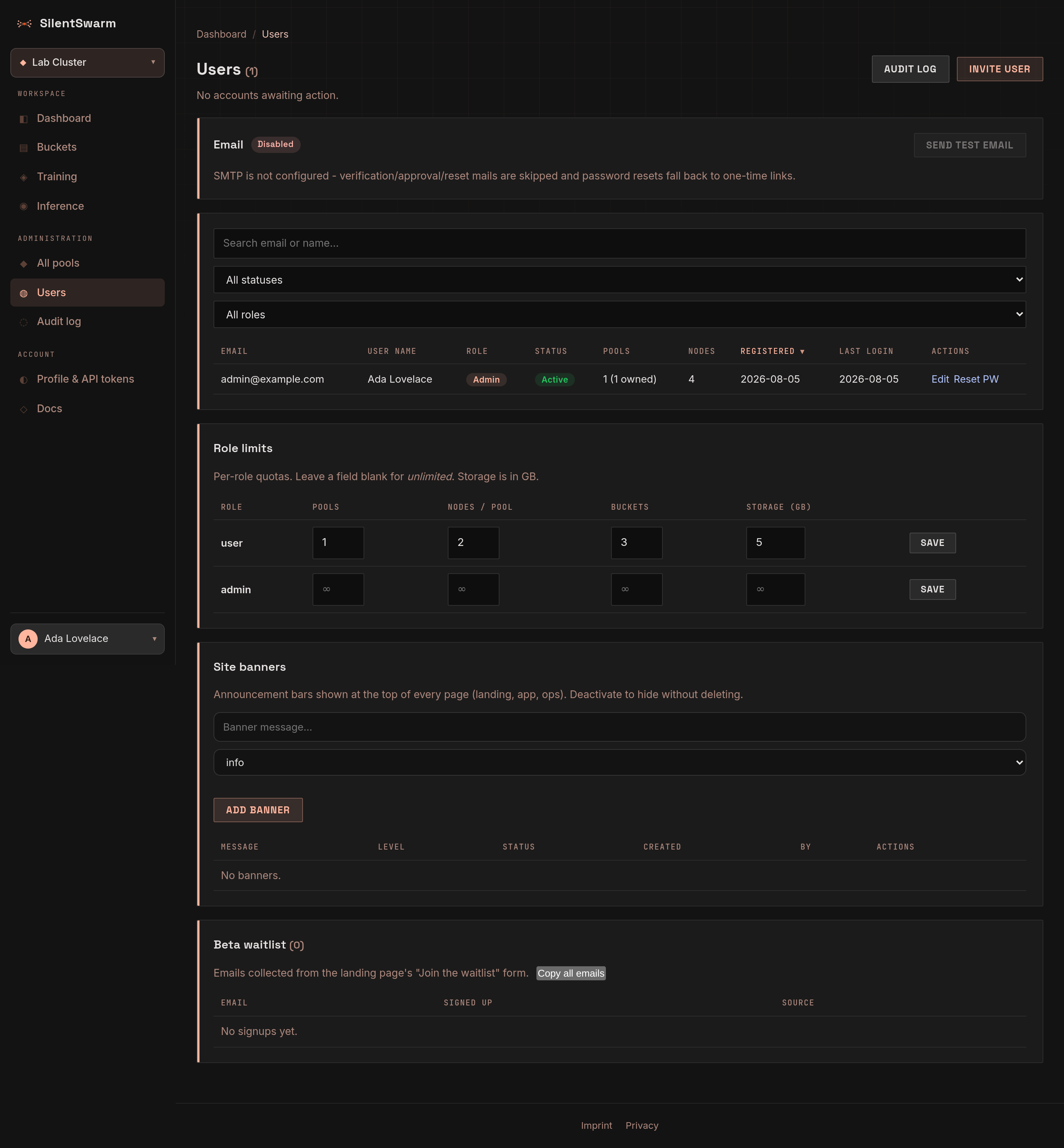
Every account on the leader, with the total next to the title.
- Invite user (top right) creates an active account and emails a set-password link. Without SMTP the link is shown on the page once, with a Copy button - hand it over yourself.
- The table shows each user as avatar, name and email in one cell, then role and status badges, pool and node counts, registration date and last login. Search by email or name and filter by status or role in the toolbar above it. On a phone each row becomes a card.
- Row actions sit behind the ... button at the end of each row: approve, reactivate, edit (name, email, role), reset password and resend verification first; Deactivate and Delete last, in red, and both ask for confirmation. You cannot deactivate or delete your own account here.
- When accounts are waiting, a note above the table says how many wait for approval and how many have not verified their email yet; Show pending filters the table to them.
Pools - /admin/pools
Every pool on the leader, whoever owns it.
- New pool opens a dialog: name, slug (the URL name, filled in from the name when left empty), visibility (public or private), an optional node limit and a description. Pools an admin creates are not subject to quotas.
- The table lists name and slug, visibility, members, nodes, node limit and creation date, with search and a visibility filter. A row's ... menu has Open (the pool page), Edit (the same dialog; the slug cannot change) and Delete, which asks first and detaches any attached nodes.
Quotas - /admin/quotas
Per-role limits on what an account may create: pools, nodes per pool, buckets and storage (in GB). One row per role. Leave a field empty for unlimited. Each field is checked as you type (whole numbers only), and a row's Save button becomes active once you change something in it; each role is saved on its own.
Announcements - /admin/announcements
Banners shown at the top of every page - the landing page, the app and the consoles.
- New announcement: write the message (up to 500 characters), pick a level (info, warning or success) and Publish announcement. It is live at once.
- All announcements lists each banner with its level, whether it is live or hidden, when and by whom it was created. The ... menu switches it between live and hidden (Deactivate keeps it for later) or deletes it, after a confirmation.
Waitlist - /admin/waitlist
The addresses collected by the landing page's Join the waitlist form, newest first, with the count next to the title. Copy all emails puts every address on the clipboard, one per line - ready for the Bcc field of a mail client.
Inquiries - /admin/inquiries
Messages from the contact form on the business pages - for compute heat pumps, for compute buyers and for research labs - newest first: when it arrived, who sent it (name, company or institution, email), the segment (Heat reuse, Compute, Research; (DE) when it came from the German page) and the message. Delete removes one for good, after a confirmation - for spam, or when the sender asks to be forgotten.
When SMTP is configured, every active admin also gets a copy of each new inquiry by email. Reply from your own mail client: the sender gets no mail from the leader, so the public form cannot be used to send mail to anyone.
Email - /admin/email
Whether the leader can send transactional mail (email verification, account approval, password resets, invites).
- SMTP shows Configured or Not configured. Without SMTP those mails are
skipped: accounts are approved on the Users page, and password resets and
invites give you a one-time link instead. The page names the
SWARM_SMTP_*settings to set on the leader (see Transactional email). - Send test email sends a message to your own address and tells you whether it was delivered, failed, or is still being retried.
- Recent mail lists the latest messages in the outbox with their status, attempts and the last delivery error.
Direct links - /admin/network
Whether fellows reach each other directly - through an encrypted tunnel - or
through the leader's relay. The tunnel needs no open ports and no root on the
fellows: each one connects out to the leader's mesh server (Headscale at
https://mesh.<your domain>), and the tunnel finds a direct path on its own,
or uses a public relay where none exists.
- Mesh shows On, Off or Waiting for the mesh server, with the reason
when it waits - usually a missing DNS record. The steps to fix it are listed
right there: add the record
mesh.<your domain>pointing at the leader's server, start theheadscaleservice with the leader. Nothing else: once it answers, it switches on by itself. - Direct links between fellows is the switch. On, fellows on the current version join within seconds (they download Tailscale into their install folder, check it, and run it without root); off - after a confirmation - they leave and use the relay again.
- Fellows lists each fellow with its tunnel address (Needs swarm update for older ones) and how it reaches each peer: direct, via relay, idle (no traffic yet) or offline.
Fellows of one pool reach each other only on the pipeline ports
(SWARM_MESH_PORTS, default 5557-5600); fellows of different pools cannot
reach each other at all. Serving and training use the tunnel automatically.
Connected apps - /admin/apps
Every app connected to the leader through the browser sign-in (OAuth) - Claude Code, claude.ai connectors, Cursor, VS Code - for every user: the app's name and where it returns, the user, what it may do (Read, Operate, Admin), when it was connected and when it was last active. Search finds an app or a user.
Disconnect ends a connection at once, both its access and its refresh
token, the same as the user's own Disconnect on the
AI agents page; the user can connect the app again.
Use it for an app that misbehaves or an account that should no longer have
agents. Each disconnect is in the audit log as oauth.disconnected, with
by=admin and the user. Apps that use an API token are not listed here: their
tokens are under the user's profile, and deactivating the user revokes both
kinds.
Registered apps, below, lists the apps users registered by hand for tools
that ask for an OAuth client ID - with their owner, client ID, whether they keep
a secret, and their connections. Delete removes one and ends every
connection it holds (oauth.client_deleted, by=admin).
The lists and the buttons work from an admin's browser session only. No API token - not even one with the admin scope - can list or end OAuth connections, so an agent cannot see or remove another agent's access.
Audit log - /admin/audit
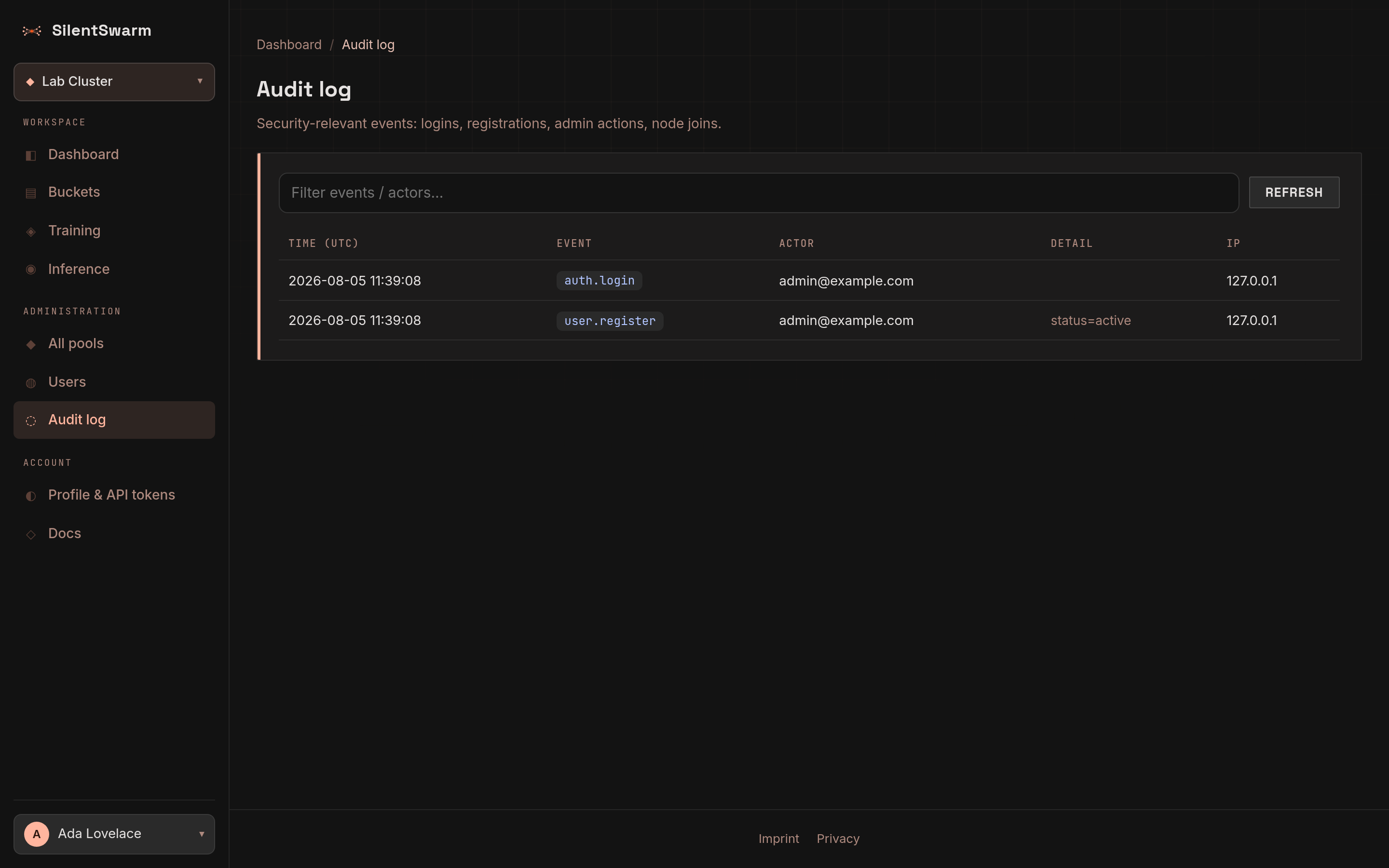
A record of security- and account-relevant events, newest first - logins, registrations, user and pool changes, invites, role edits, banners, node lifecycle actions and every change an agent made over MCP - with time (UTC), event, actor, detail and IP. The latest 500 matching events are loaded.
- Text filter - typing narrows the loaded rows at once, then (after a short pause) asks the leader for matches in event, actor or detail across the whole log, so an older event is found even when it is past the newest 500.
- MCP calls - a toggle that loads only the changes agents made over MCP:
events named
mcp.<tool>(for examplemcp.fellows_release), with the token's label, the argument names and the outcome in the detail (via=mcp token=<label> args=... result=ok|refused|error).refusedmeans the confirmation was declined or missing and nothing changed;errorthat the route refused the change. Reads an agent makes are not logged there; the route's own event (admin.user_delete,banner.create, ...) is written beside it as for a change made in the browser, and both rows carry the agent's address (resolved pastSWARM_TRUSTED_PROXY_HOPSlike every other row). - Event type - sign-in and accounts, admin actions, failures and lockouts, agent changes (MCP) or other; it filters the loaded rows.
Refresh loads new events. Use it to review who did what, and when.
API tokens from before scopes
When the leader holds API tokens created before token scopes existed, every
admin sees a warning above the page, on whatever page they open next: such a
token keeps its owner's whole power (operate, and admin for an admin's). It
links to Profile > API tokens, which lists every user's tokens for an
admin and marks these Legacy - create a narrower token for each use, then
revoke the old one. Dismissing the warning hides it in that browser
(swarm_legacy_tokens_ack cookie); it is gone everywhere once no legacy
token is left.
From an AI agent (MCP)
An admin can do the work of these pages from an AI agent (Claude, an IDE
assistant) through the leader's MCP endpoint, toolset admin
(https://<leader>/mcp/admin, or /mcp/all). The toolset is listed only for
an API token that belongs to an admin and carries the admin scope
(API token scopes); any
other token neither sees these tools nor can call them, and a demoted admin's
token loses them at once.
| Area | Tools |
|---|---|
| Users | admin_users_list, admin_users_pending_count, admin_users_signup_intents, admin_users_create, admin_users_update, admin_users_approve, admin_users_set_status, admin_users_reset_password, admin_users_resend_verification, admin_users_delete |
| Pools | admin_pools_list, admin_pools_get, admin_pools_create, admin_pools_update, admin_pools_delete |
| Quotas | admin_quotas_get, admin_quotas_set |
| Announcements | admin_banners_list, admin_banners_create, admin_banners_update, admin_banners_delete |
| Audit, email, waitlist, inquiries | admin_audit (with the event_prefix and text filters above), admin_mail_get, admin_mail_test, admin_waitlist, admin_inquiries, admin_inquiry_delete, admin_funnel |
| Fellows | fellows_release, fellows_remove, fellows_update, fellows_set_speed, fellows_retry_purge |
| Direct links | admin_mesh_get (the page above), admin_mesh_set (the switch; switching off asks first) |
| Models | models_delete - removes a trained model from the catalogue and its weights from the leader (DELETE /api/v1/models/{model_id}, admin only). Refused while the model is loaded or loading anywhere: unload it first (models_unload). |
Asks you first. Deleting a user, pool or announcement, deactivating a user,
creating an admin or promoting someone to admin, changing a user's email,
and releasing, removing or updating fellows ask you to confirm before anything
happens. A client that supports MCP elicitation shows you the question
directly - and your answer wins even if the agent claimed you agreed; with
other clients the tool refuses and tells the agent what it would do, and runs
only when called again with confirm=true. The question names what is
affected (accounts, pools and how many nodes, fellows by id and host); names
that users typed appear in quotes.
Never with a token. An agent cannot reset the password of, send a
verification link to, change the email or role of, or delete the account its
own token belongs to. And it never receives a one-time sign-in link: when SMTP
is not set up, inviting a user or resetting a password answers link_withheld
instead of the link - create the link in the browser on the Users page, which
shows it to you. The REST routes behind these tools apply the same rule to
every API token (the CLI's or an OAuth connector's), so a leaked admin token
cannot take over the account it belongs to.
Reads (lists, the audit log, the funnel) are not rate-limited and not written
to the audit log; every change counts against the token's MCP write limit
(SWARM_MCP_WRITE_BURST, SWARM_MCP_WRITES_PER_MIN) and appears under
MCP calls.