Buckets
A bucket bundles everything a training run needs — a base model plus one or more datasets — so you can launch reproducible runs from the Training console. A bucket belongs to a pool.
Buckets list — /buckets
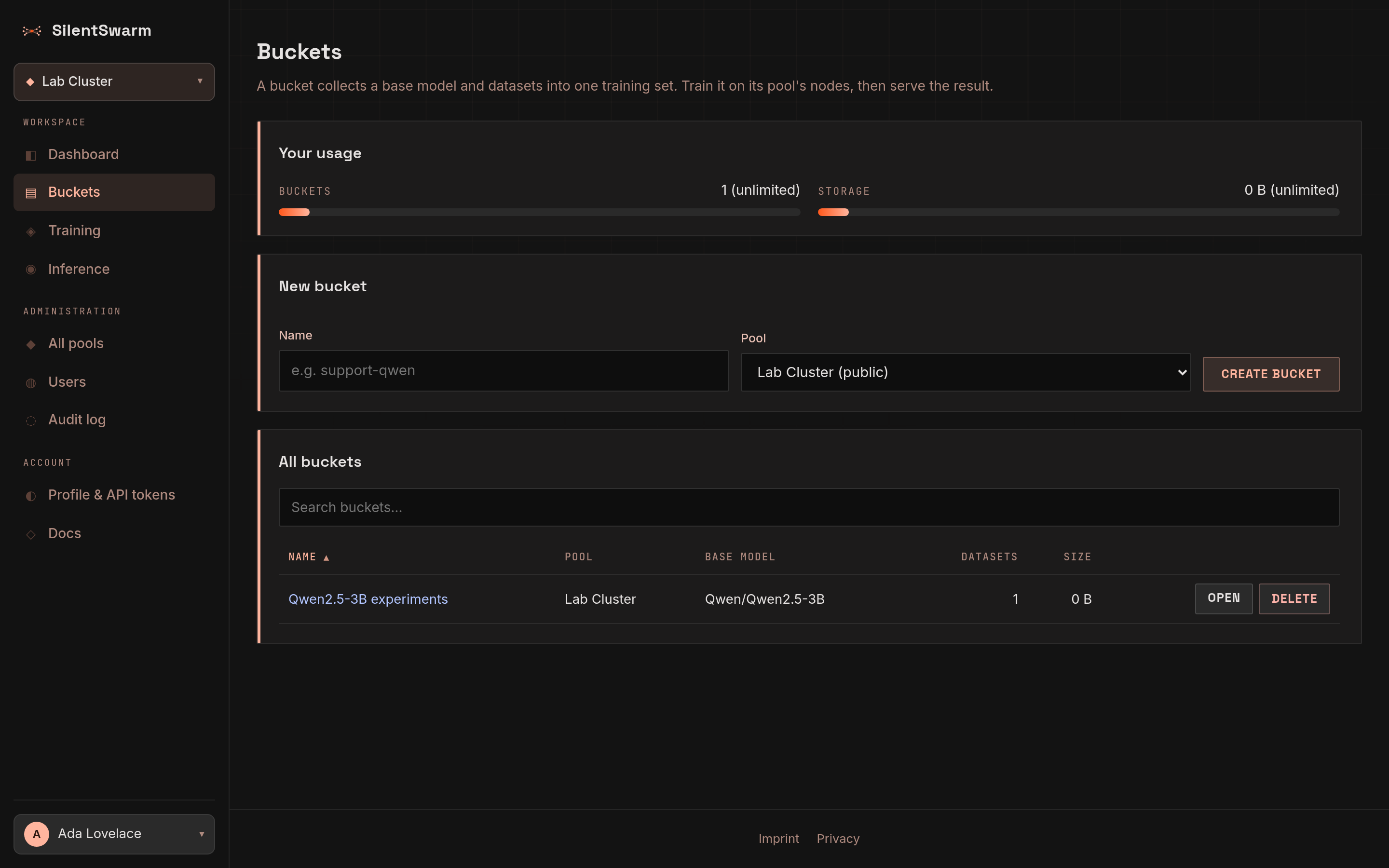
Every bucket you can see, across the pools you belong to, in one table: name, pool, base model, dataset count and size. Type in the search box to filter by name or base model; click a column header to sort.
- Usage — two slim meters beside the page title show how many buckets you have and how much storage your uploads take, against your role's quota. With no quota the meter is replaced by "no limit".
- New bucket — the button at the right of the table toolbar opens a dialog
asking for a name and the pool it trains on (your active pool is
preselected), and optionally its owner (you, or an organization you belong
to) and address. The address preview shows where it will live, for example
/buckets/you/support-tickets; a taken slug is flagged before you submit (see Organizations and addresses). Missing fields are flagged under the field; you land on the new bucket's page to add a base model and datasets. - Row menu (
…) — Open, and for buckets you own Delete, which asks for confirmation first. Deleting removes the bucket's datasets; models already trained from it stay.
Bucket detail — /buckets/{owner}/{bucket}
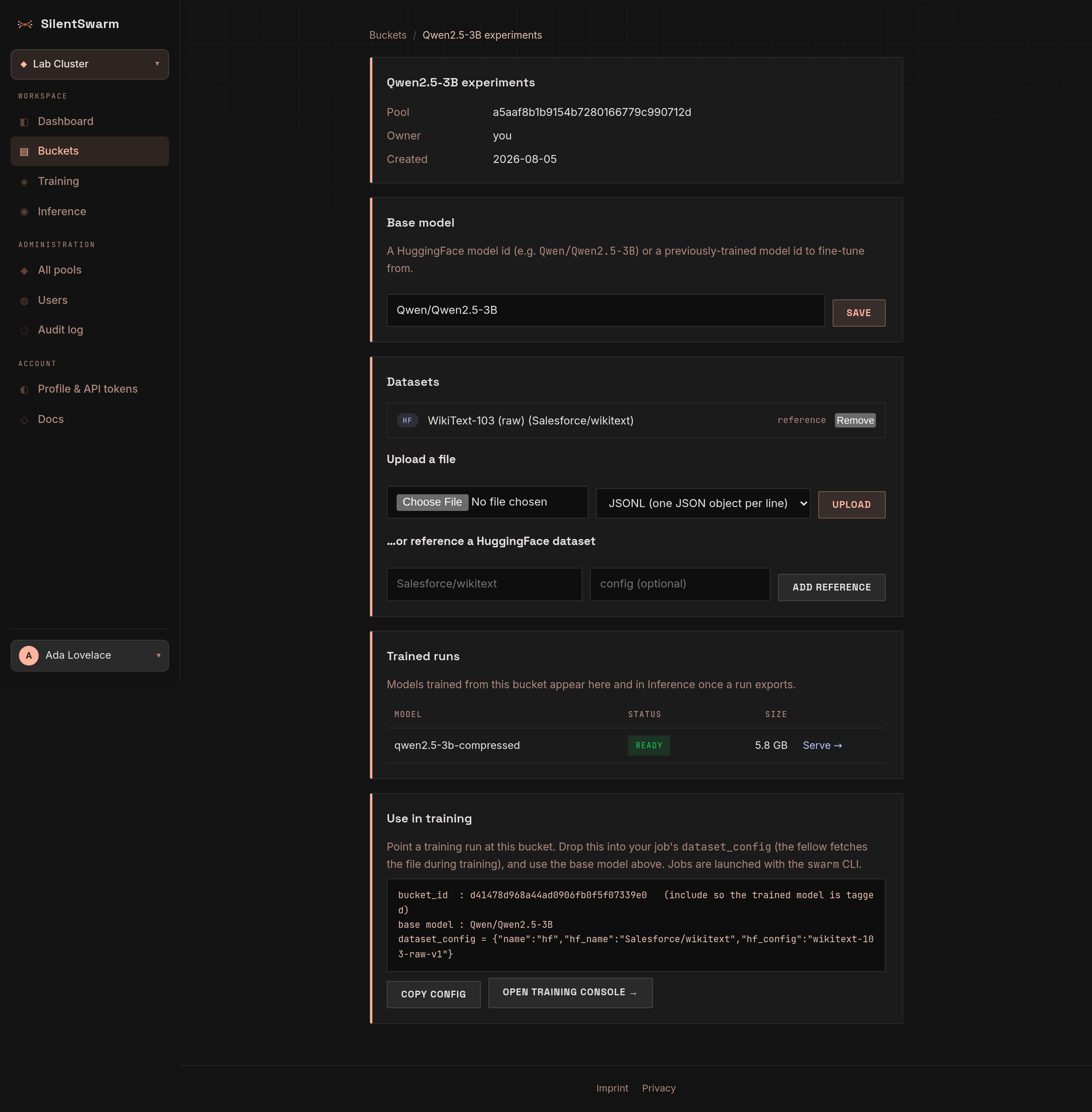
Two columns on a desktop, one on tablets and phones (the summary comes first).
Left - the data
- Datasets — everything attached to the bucket, each with its kind (upload
or HuggingFace), size and a remove button (confirmed). The owner gets two
ways to add more:
- Upload a file — drop a file on the drop zone or click it to choose one, check the Format (JSONL or plain text; it is preset from the file extension), then Upload, the page's primary action. A run keeps the file's last rows, one in twenty, out of training and scores itself on them; a file of under 20 rows is not scored.
- Import from a URL (API and AI agents) — instead of uploading,
have the leader download a JSONL or text file from a public
http(s)URL:POST /api/v1/buckets/{id}/datasets/importwith{"url": "...", "name": "...", "format": "jsonl" | "text"}, or thedatasets_uploadMCP tool withsource_url. The same owner and storage quota rules apply as for an upload; one import is also capped atSWARM_BUCKET_IMPORT_MAX_BYTES(default 200 MB) andSWARM_BUCKET_IMPORT_TIMEOUT_S(default 600 s). The leader only fetches from public servers: a URL whose host resolves to a loopback, private, link-local, carrier-grade NAT, reserved or multicast address (localhost,10.x,192.168.x, the cloud metadata address169.254.169.254, ...) is refused, every redirect (at most 3) is checked again, and the connection goes to the address that was checked. URLs with a user name or password in them are refused too; an internationalised host name is fetched under its ASCII (IDNA) form. The quota is checked again when the download finishes, so parallel imports cannot together go past it. Every import - done or refused - is written to the audit log (bucket.dataset_import/bucket.dataset_import_refused) with the URL, the final URL after redirects and the size. Multi-GB files stay a job for the upload. Over MCP,datasets_uploadalso takes the file inline ascontent(at most 5 MB); a URL import reports progress while it downloads. - Reference a HuggingFace dataset — a dataset id such as
Salesforce/wikitextwith an optional config. Datasets with several configs need one (wikimedia/wikipediawants e.g.20231101.en). The fellow streams just the rows a run needs from the Hub when training starts, so a large corpus is not downloaded in full. - Preload (on a HuggingFace reference, owner only) copies the rows a
run needs - about 4 MB of text, within your storage quota - from the Hub
into this bucket as a JSONL file, through the Hub's dataset viewer. A
dataset with several configs and none set asks which one first (the
English one is suggested) and remembers the choice on the reference. The
file then wins over the reference when a run trains, so fellows
read it from the leader: no Hub rate limit, outage or missing config at
step 0, and every fellow trains on the same text.
The viewer rate-limits fast paging (datasets of one-line rows like
WikiText need hundreds of pages), so pages are paced and a refusal
(429 or 5xx) is retried with backoff. If it keeps refusing once at
least 1 MB is in hand - more than a run reads - the preload keeps that
and says so (
partial: true) instead of failing.
- Use in training — once a base model and a dataset are set, Train this
bucket opens the Training console's
New training run form with this bucket
picked; until then the card says which of the two is missing. From the CLI,
GET /api/v1/buckets/{bucket_id}/train-job(or the MCP toolbuckets_train) returns the same job ready to submit.
Right - the summary
- Pool (by name), base model, creation date, owner and dataset count.
The owner edits the base model with the pencil button: a HuggingFace model id
(e.g.
Qwen/Qwen2.5-3B) or a previously trained model id to fine-tune from. - Trained runs — models trained from this bucket, with their status and a Serve link once ready. They also appear in Inference once a run exports.
Only the owner sees the edit, upload and remove controls; other pool members see the bucket read-only.