Training console — /pools/{owner}/{pool}/training
The operations hub: add machines to the swarm, launch training runs, and watch
the cluster live. Everything here is scoped to the pool in the URL
(?pool=…, which the sidebar's Training link adds for your active pool);
without one the console shows every pool you can see and its header says
All pools.
Header
One row at the top: the page title, the pool the console is showing, and a status dot with its words (3 fellows ready, Training on 2 fellows, 1 of 3 fellows online, No fellows connected). On the right are the ways to put work into the swarm:
- New training run (the primary action) starts a run from a short form.
- Add fellow opens the join dialog below.
New training run
A run without the CLI. The form asks for three things:
- Model - one of the pool's buckets (its base model, trained
on its dataset; a bucket's Train this bucket opens the form with it
picked), or a Hugging Face model by id (
Qwen/Qwen3-1.7B), trained on WikiText. On All pools a Pool field picks where it runs. - Steps - how many batches the run trains on. A run with more steps than its dataset has batches goes over the dataset again from the start, and the first fellow's log says how many times ("The dataset holds 215 batch(es) of 1 x 4096 tokens: the 240 steps go over it 1.1 times"). Longer sequences mean fewer batches from the same data: the 2,699-row Guanaco set is about 880,000 tokens, 1,723 sequences of 512 but only 215 of 4,096. Data shorter than one batch stops the run before any work.
- Tokens per sequence - 128 (the default) up to 8,192. Longer sequences teach the model longer context and need more memory per step; the plan under the form says whether the length fits the pool, and when the leader turns on recompute for it. See Long sequences.
- Compression between stages - what crosses the network from one fellow to
the next when the run spans several: none (the full activations, the
default) or a learned bottleneck (half the hidden width in 8-bit codes,
a quarter of the traffic, trained with the model). The fixed 8/4-bit boundaries (
fixed_int8,fixed_int4) are left to job files: they scale the whole tensor by its largest value, and models with outlier activations - the Qwen family among them, with values in the thousands next to a median below 1 - lose most of the signal. On Qwen3-0.6B the next-token loss went from 1.64 to 10.4 at 8 bits; Qwen3-14B behind a 4-bit boundary started at 13-15 and diverged to NaN. A learned bottleneck has neither problem: it scales every token by its own largest value, and before step 1 it is calibrated to the activations it will carry - the stage before it runs 16,384 tokens forward and starts the bottleneck on their principal components. On Qwen3-0.6B that kept 99 % of the model's next-token accuracy with no training at all. The bottleneck it replaced started from random weights at 3 % of it; Qwen3-14B behind it trained back to only 73 %. With LoRA, a run with a learned bottleneck puts adapters on the feed-forward layers as well as attention ("model": {"lora": {"mlp": false}}turns that off; explicittarget_modulesare used as given), so the stages can adapt to the boundary. Models trained with that older bottleneck no longer load: retrain them.
Under Chosen by the leader, greyed out, are the settings you do not pick:
- Batch size - the largest of 32, 16, 8, 4, 2, 1 sequences of the chosen length whose memory estimate fits every GPU the run is placed on (the same estimate that holds a job which would not fit). A bigger model or smaller cards get a smaller batch. It is decided when the fellows are ready, so until then the field says so.
- Learning rate - from what trains: 2e-4 for LoRA adapters, 1e-4 for a boundary compressor alone (it starts calibrated), and for a full fine-tune 5e-5 under 1B parameters, 2e-5 up to 10B, 1e-5 beyond. It adapts over the run: a linear warm-up over the first 5% of steps (at most 100), then cosine decay to a tenth of the rate by the last step.
- Method - LoRA adapters (rank 8) on a frozen base model, whose weights a pipeline stage keeps in half precision. When the base model would not fit the placed GPUs that way even at batch 1, it is stored in 4 bits (NF4, as in QLoRA): a 14B model takes ~30 GB in half precision and ~8 GB in 4 bits, so Qwen3-14B trains on two 4 GB and two 6 GB cards. A model that fits as it is stays unquantized. When the run completes, the adapters are merged and the model appears in Inference.
As you fill it in, the form asks the leader where the run would go
(POST /api/v1/jobs/plan, nothing submitted) and shows the fellows and layers,
or why it would wait - not enough ready fellows, or not enough GPU memory even
at batch 1. Start training submits it either way; a waiting run starts by
itself once that changes, and appears under Training run right away.
The same choices are open to a job file: "batch_size": "auto",
"learning_rate": "auto" (which also sets "lr_schedule": "cosine") and a
learned bottleneck's "bottleneck_dim": "auto" (a learned bottleneck with no
width at all gets the automatic one too), and "model": {"quantization":
"auto"} (4 bits when a LoRA run would not fit otherwise, else none; a full
fine-tune is never quantized). The leader replaces each with
a number before anything is sent, keeps what it chose and why under the job's
auto_settings, and swarm train --plan shows them. A number you set is never
changed. train.lr_schedule ("constant" or "cosine") and
train.warmup_steps can also be set by hand. A job file that sets no
learning_rate at all is treated as "auto": the fellows' own fallback, a
constant 3e-4 without warm-up, is too high for a large QLoRA run (a Qwen3-32B
job drifted for 200 steps at it and ended in NaN).
Each pipeline stage clips its gradients to a total norm of
train.max_grad_norm (default 1.0, 0 turns it off) before every update,
and skips an update whose gradients are not finite - a float16 overflow - instead
of writing NaN into the weights. One batch's outlier gradient can then no longer
throw the adapters far. The norm is per stage, not across the whole pipeline.
Add fellow
The dialog's Generate join command creates a short‑lived (one hour),
pool‑scoped invite and shows a curl … | bash command with a Copy button.
Run it on any GPU machine; the node bootstraps itself and connects back. While
it does, the dialog shows the session's status (Pending, Active,
Completed, …) with the joining host, and the bootstrap script's output in a
small Setup log. Open in log panel moves that output into the full log
stream at the bottom of the page.
The session outlives the dialog: close it and reopen it, and you get the same command and its progress back rather than a second invite. Generate a new command mints a fresh one deliberately. When the fellow finishes joining, a notification says so and it appears in the graph and the table.
The bootstrap is HTTPS‑only, verifies a published checksum, and (in beta) can be locked to invite tokens — see bootstrap hardening. Without JavaScript the page shows the plain join command instead.
How a run uses the pool
How the pool's resources are used. When the job starts, the leader takes
every ready fellow in the pool that has a GPU with enough free memory, and each
one runs a stage of the pipeline: the first embeds the tokens, the last computes
the loss, and any in between pass activations forward and gradients back. A job
uses up to 16 fellows this way. While any fellow in the pool runs a version from
before longer pipelines, it stays at two (the two with the most free VRAM), and a
job that asks for more with min_workers waits and names the fellows to update
(swarm update). Every stage adds a network hop per step, so a model that fits
on two fellows trains fastest on two; "max_workers": 2 caps how many
use_all_workers takes. The model's layers are split between the
fellows by their free VRAM (weighted), then moved toward the faster cards
when every card is measured (see Layers by speed), and each fellow then
spreads its share over all of its own GPUs, filling every card to the same share
of its free memory (the card that also holds the embeddings, or the output head
and the loss, takes fewer layers). One number format is chosen for the whole job
from what every card can run - float32 when the cards have no 16-bit format in
common, e.g. a GTX 1050 Ti beside a GTX 1660 SUPER. --plan shows the fellows
and the split between them; the per-GPU split inside a fellow is decided when it
loads the model. Add --lora to the last line to train adapters instead of every
weight, which needs far less memory.
Layers by speed. Free memory says what fits, not what is fast. A 14B run put 20 of its 48 layers on two GTX 1660 SUPERs and 28 on an RTX A4000, by free VRAM. The A4000 did its share in about 10 s of each 87 s step and still had 6 GB free; the 1660s took the rest. So when every placed card has a speed figure (the pool's Speed and network card; Measure a node to get one), the planner predicts a step from those figures and moves layers toward the faster cards while the prediction falls and every card still holds its share by the memory estimate:
- A stage's compute is the parameters of its layers on each of its GPUs over that GPU's measured TFLOPS (float16 when the run computes in half precision and every card has a float16 figure, else float32), plus the output head on the last.
- With one micro-batch the stages run in turn, so a step costs their sum, and layers go to the fastest card until its memory is full. Each further micro-batch overlaps the stages and adds the slowest once more, which evens them out.
- The network is left out: every boundary carries the same bytes, wherever it falls.
- A card that gains layers keeps 1 GB, or a tenth of its free memory, free by the estimate. The estimate has been right on an RTX A4000 but 1.5 GB low on a 6 GB GTX 1660 SUPER, and this split is the one that fills a card. A card that only gives layers away is never held back.
- A node that gains layers must also have the disk for their files (its share of the checkpoint). Files already in its Hugging Face cache still count, as the leader cannot see them.
Chosen by the leader in the New run form shows Layers per fellow with
the reason, e.g. "8 + 40 - by measured fp16 speed within each card's memory
(20 + 28 by free memory), a step predicted 44% shorter"; --plan prints the
same line and the plan's auto.split holds it. When a card has no figure the
split stays by free memory, and the reason names the card. A pinned boundary
(layer_index) is never moved, and partition: equal keeps an even split.
Keeping every fellow busy. With one batch per step, only one fellow works
at a time: stage 1 waits for stage 0, then stage 0 waits for stage 1's
gradient. Set train.micro_batches to split each step's batch into that many
micro-batches that overlap across the fellows. The step still trains on the
same batch, and the gradients add up to exactly what the whole batch gives.
The share of a step each fellow then sits idle is (N - 1) / (M + N - 1) for
N fellows and M micro-batches; --plan prints it. M must divide
batch_size. A job that names none gets the largest divisor of batch_size
up to twice the number of fellows, chosen by the leader. On two fellows (QLoRA
Qwen3-1.7B, batch 4) four micro-batches took a step from 11.8 s to 5.7 s, at
the same loss and with half the peak memory on the card holding the head. Set
train.micro_batches: 1 to train the batch whole. train.schedule picks the
order: 1f1b (default) holds fewer micro-batches' activations in memory than
gpipe, at the same speed. train.recompute: true trades about a third more
compute for keeping only each block's input in memory; left unset, the leader
turns it on when a job fits only with it (Long sequences).
false keeps it off. A stage waits for its
neighbour's whole step, which on a slow card or a large stage takes minutes;
train.link_timeout_s (default 600) is how long it waits before it gives the
job up. A run whose loss turns into NaN or infinity has diverged - its
weights are NaN from then on - so the fellow stops it at that step and the job
fails with the step and the last finite loss; lower the learning rate or turn
off compression between stages before trying again. Fellows from before
train the batch whole, and the plan says which ones.
Mixture-of-experts models (Mixtral, Qwen3-MoE, gpt-oss) train like any
other. With --lora the adapters go on the attention layers and the experts
stay frozen. With model.quantization every expert is stored in 4 bits too,
so a ~100B MoE model fits about the same cards as a 100B dense one at 4 bits,
and decodes far faster, since a token only reads the experts it is routed to.
Saved state. Every 50 steps each stage of a pipeline saves what it would
need to continue - its trainable weights (adapters, the learned bottleneck, or
its blocks in a full fine-tune), the optimizer's state, the learning-rate
schedule's position, the step and the random state - and uploads it to the
leader. The base model is never part of it, so for an adapter run it is small:
about 1 MB per stage for a small model, a few hundred MB for a 14B one. All
stages save the same steps, and the leader counts a step as saved only once
every stage's file has arrived and checked out (size, SHA-256, and a header
naming the job, step and stage). It keeps the last two saved steps of a running
job, and only the newest once the job has ended, for 7 days. A run's latest
saved state is downloadable mid-run (GET /api/v1/jobs/{id}/snapshots, MCP
jobs_snapshots), and the Step tile shows it as "saved at". Set
train.snapshot_every_steps to change the cadence, or to 0 to save nothing;
the cadence is in steps, never in minutes, because every stage has to save the
same step without asking the others. Snapshots of a job trained from a bucket
count against the bucket owner's storage. A job with a fellow from before
snapshots saves none (swarm update). Measured on a small two-stage adapter
run, saving every 50 steps cost nothing measurable (within the run-to-run
noise); saving after every step cost about 9 %.
Resuming a stopped run. A pipeline run that stopped - you cancelled it, a
node dropped out and it failed, every fellow rebooted, or the leader restarted
under it - can continue from its latest saved step instead of from step 0:
the Resume button beside the job's status on the Training page,
swarm resume <job_id>, MCP jobs_resume, or
POST /api/v1/jobs/{id}/resume. Every stage starts again on the node that
ran it, restores its saved state, skips the batches it already trained on and
trains on from the next step; the steps trained after that save are trained
again, and the job records how many (config.resume.lost_steps, and every
resume in config.resumes). The job reads Recovering until a stage reports
a step past the saved one, then Running again; a resumed run reports the
same losses as one that never stopped. The held-out evaluation of the base
model runs only at a run's first start, so a resumed run reports only the
trained model's. A resume is refused, with the reason, when the run has no
saved step yet, another job is active, a stage's node is offline, not idle, no
longer an active member of the pool, or on a version from before resume
(swarm update). A job that still shows Running while its fellows are
training cannot be resumed - stop it first; one whose fellows have all stopped
(the leader lost track of it) can. A resume by hand never moves a stage to
another node.
When a node drops out. With automatic replacement on
(SWARM_AUTO_REPLACE=1), a pipeline run whose node goes offline is not lost:
the leader continues it from its last saved step, on a standby or - with none
free - split over the nodes left (see Pools, What happens to a
running training job). Two job settings say what to do when no standby can
take the stage:
train. |
Default | Meaning |
|---|---|---|
on_node_loss |
wait |
wait for a standby, then split over the nodes left; resplit at once; fail the run |
recovery_wait_s |
600 |
How long wait waits for a standby |
A run split again keeps training the same model, with the same adapters and optimizer state, on fewer stages; its loss continues where it was. A job that trains a learned bottleneck between stages is never split again (the bottleneck belongs to its boundary), and needs a standby. The Fellows tile counts how often a run was recovered.
Each fellow downloads only its own share of the model: the files that hold its
layers, plus the embeddings on the first fellow and the output head on the last.
--plan lists how much that is per fellow against its free disk - measured
where the fellow keeps its Hugging Face cache, which is where the files land. A
4-bit (model.quantization: {"bits": 4}) or 8-bit job quantizes each layer as
it loads, so no fellow ever holds its share in 16 bits. The layers still
compute in the job's model.dtype (float16 on most cards), LoRA adapters
included - the adapters are kept in float32, but the activations a stage
receives across a learned boundary are rebuilt in the layers' dtype, not the
adapters'.
Not enough disk. A fellow whose free disk cannot hold its share, with
half a GB to spare, is left out when the job fits the other nodes - also when
it was the node whose small cards made the plan too tight - --plan and swarm jobs show say so
under Chosen ("left out for disk: fellow 28460 has 0.6 GB free disk, its
share ... is 6.06 GB"). When the job does not fit without it, it waits with
not enough disk: ... as the reason: free space on that machine (old models in
its Hugging Face cache), or set memory_check: false if it has the files
cached already - the leader cannot see the cache. On the fellow itself, a stage
checks the disk before it downloads and fails at once, with the numbers, rather
than part-way through a download.
One stage fails, the run stops. When a stage reports a failure, the leader
tells the other stages to stop at once (PAUSE with reason stage_failed):
their workers would otherwise wait 10 minutes for a frame from the stage that
died, holding their GPUs. The job keeps the first error, prefixed with the
fellow that failed (fellow 28460: ...); the timeouts of the stages after it
are its echo and do not replace it.
Long sequences
What a step holds in memory grows with the tokens per sequence
(train.seq_len). Three things keep it linear and small enough for 4-16 GB
cards. The leader prices all three only when every fellow of the job runs a
version that has them - after swarm update; until then its plan says so:
- Memory-efficient attention. On cards without Flash Attention (GTX 10xx
and 16xx, RTX 20xx, Quadro and Tesla of those generations) attention used to
keep every head's
seq x seqscores - 2.7 GB a layer at 4,096 tokens. A stage now runs PyTorch's memory-efficient kernel there, which keeps none. - Chunked loss. The last stage computes the logits over the vocabulary for about 150 tokens at a time (a 152k vocabulary; more for smaller ones) instead of the whole batch at once: 4,096 tokens of logits were 7.5 GB.
- Recompute. With
train.recomputeunset, the leader turns it on when the job fits only with it: every block keeps just its input and runs again in backward, about a third more compute per step. Chosen in the plan (and the form's hint) says so.
On the three-node pool of 2026-10-20 that moves OpenReasoning-Nemotron-14B
(4-bit, LoRA) from 512 to a few thousand tokens per sequence. A 64k-token
sequence still does not fit cards this size: one block's activations alone are
tens of GB. Serving context is separate (SWARM_SERVE_CONTEXT_TOKENS).
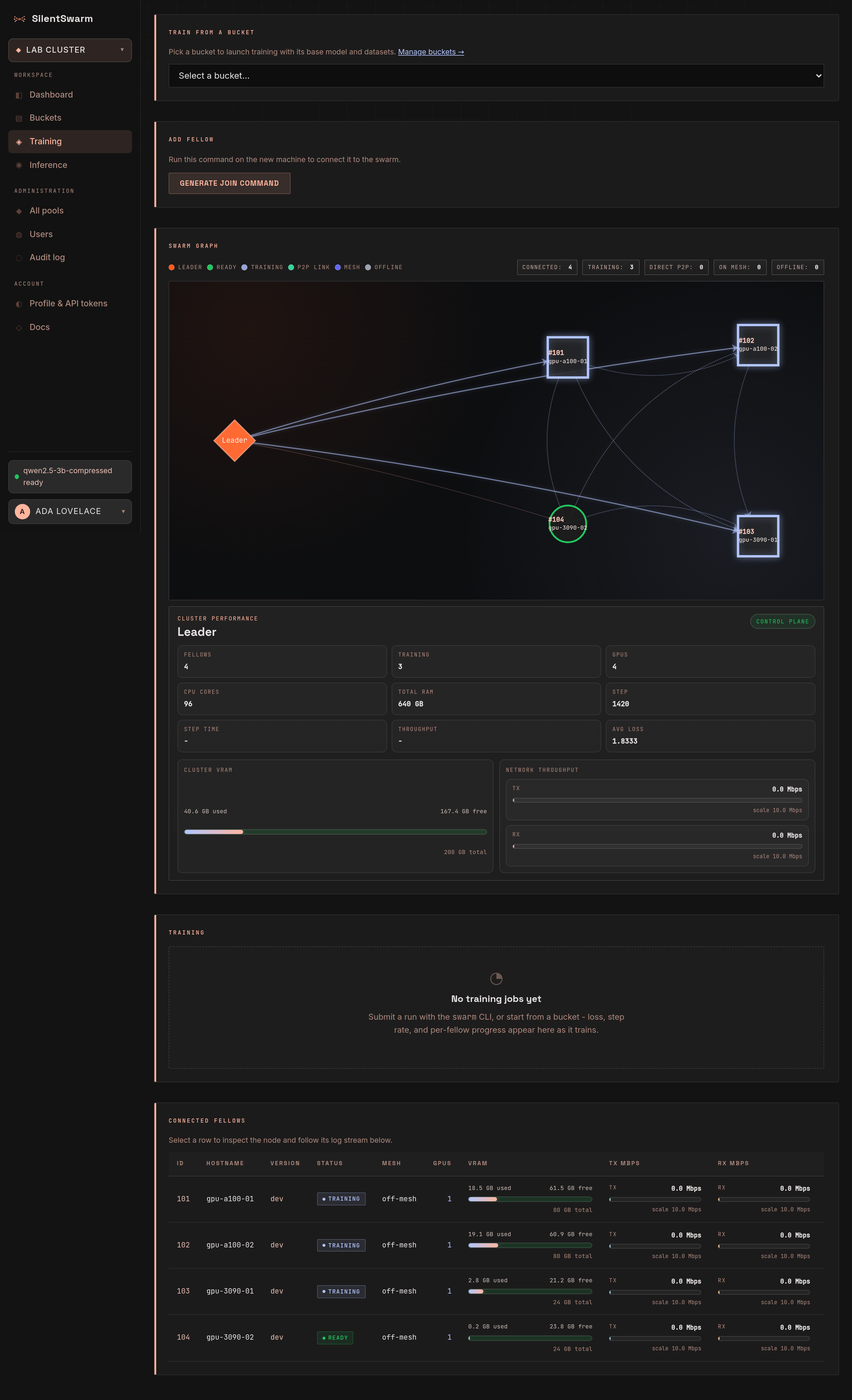
Cluster performance
A row of stat tiles under the header, refreshed with every node report:
| Tile | Shows |
|---|---|
| Fellows | connected fellows, and how many are ready, training or offline |
| GPUs | GPU count, with the pool's CPU cores and RAM underneath |
| VRAM used | VRAM in use across the pool, of the total |
| Step | the highest step any fellow has reported |
| Step time | seconds per step, measured between reports, and steps per minute |
| Avg loss | the mean of the fellows' latest loss |
Swarm graph
A live graph of the cluster across the full width of the page. The Leader sits on the left; each connected fellow is a node whose shape and colour encode its status, and the legend beside the title repeats the shapes. Edges show the transport between stages — a dashed direct P2P link (fellow to fellow, the default on a mesh), a dotted hop relayed through the leader, or the tunnel to the leader. Hover a node or an edge for a summary card.
Above the graph, one sentence says what it shows, for example 3 fellows connected: 3 ready, 0 training, 0 offline; no direct links; 0 on the mesh. Screen readers get the same summary as the graph's description, and the connected fellows table carries the per‑node detail.
Drag the graph to move it; Ctrl + scroll (or a trackpad pinch) zooms. A plain scroll wheel over the graph scrolls the page, like everywhere else on the console - the whole width of the console scrolls, with the scrollbar at the window's right edge.
Click a node to inspect it in the panel under the graph: status and health grade, VRAM meter, a live VRAM bar per GPU (titled with the layers the node runs in the active job), RAM, transport, P2P, mesh IP and handshake, version, and TX/RX meters.
Click the leader for the Cluster resources view:
- Cluster VRAM used across every fellow's GPUs.
- Pipeline link - the activations one stage sends forward and the gradients that come back, which is the traffic a two-node run actually generates. It is a rate over the byte counters the fellows report with their heartbeats, so it moves in steps of a few seconds and drops to 0 when the pipeline goes quiet.
- Leader traffic - the fellows' heartbeats, logs and progress to the leader, which stays near 0 Mbps even while a job trains.
- Active training job - the job, its step, dtype and where the model is split, then one card per pipeline stage: the fellow, the layers it runs and a live VRAM bar per GPU. Which layers sit on which GPU inside a fellow is decided by the fellow when it loads the model (every card filled to the same share of its free memory), so the cards show what each GPU really uses rather than a per-GPU layer preview.
The graph, the tiles, the panel and the fellows table all show the console's pool — nothing else. A node joins the pool whose join command it was bootstrapped with, so if a machine you just added is missing, it most likely landed in another pool: the console says so above the graph and links straight to the pool that holds it.
Training run
Pick a job (running jobs first, then the newest; each listed as id, model, status and start time) to see its state as a badge and four tiles: Step (of the planned steps, and the newest step every stage has saved), Loss (the latest step's, with the smoothed value under it), Fellows (live while it runs, from the job's plan afterwards, with the dtype) and Duration.
The loss curve draws each step's loss and a smoothed trend over it - an exponential moving average (weight 0.8, as TensorBoard smooths), because per-step loss is one batch's and jumps around. Past 30 points the raw line is drawn thin and without markers so the trend stays readable; a running multi-fellow job adds one line per fellow, each with its own colour, marker shape and dash. A sentence under the chart says the same in words, and Show data as table lists the numbers. With no jobs yet, the card says how to start one.
Step and loss are the job's own: what its stages report after each step
(POST /api/v1/jobs/{id}/status). Every stage reports, at its own pace, so the
one behind may report step 16 after the one ahead reported 17 - that fills in
its point but never moves the job back. The per-fellow lines come from the
fellows of the job's placement plan while they train; until a job's first step
the tiles say step 0 and no loss, whatever the fellows ran before.
Connected fellows
A table of the pool's nodes with id, hostname, version, status, Mesh membership, GPUs, VRAM, TX/RX throughput, step, loss and last‑seen. Click a row, or tab to its hostname and press Enter, to inspect that node in the graph panel and stream its logs below; the selected row stays marked. On a narrow screen the table scrolls sideways inside its card.
TX/RX is everything a node sends and receives for the swarm: its traffic with the leader (heartbeats, progress, logs - a few hundred bytes a second) and its pipeline traffic - the activations and gradients a training stage exchanges with its neighbours, and the hidden states and tokens a serving stage passes round the ring, over the direct link or the relay. The rate is averaged over the heartbeat interval (5 s), so it follows a run's steps, not each message.
Log stream
Sits directly under the fellows table and follows whichever node you selected there (or clicked in the graph).
- Level filter — All, Info, Warnings or Errors, each with its line count. Progress (step) lines count as info.
- Follow — the view tails new output automatically; scroll up to read back and the follow pauses until you hit Jump to latest (or scroll to the bottom again).
- Long streams stay fast — the console keeps the latest 5,000 lines and draws only the ones in view, so a fellow that has logged for hours scrolls as smoothly as a fresh one. Lines do not wrap; long ones scroll sideways.
- Copy puts every line the filter shows on the clipboard, Clear empties the view without dropping the stream, and Close stops it.
The log region takes keyboard focus, so the arrow keys, Page Up/Down, Home and End scroll it.