Inference — /pools/{owner}/{pool}/inference
Load a trained model onto the cluster and chat with it, or drive it over an OpenAI‑compatible API. Scoped to the pool selected in the sidebar.
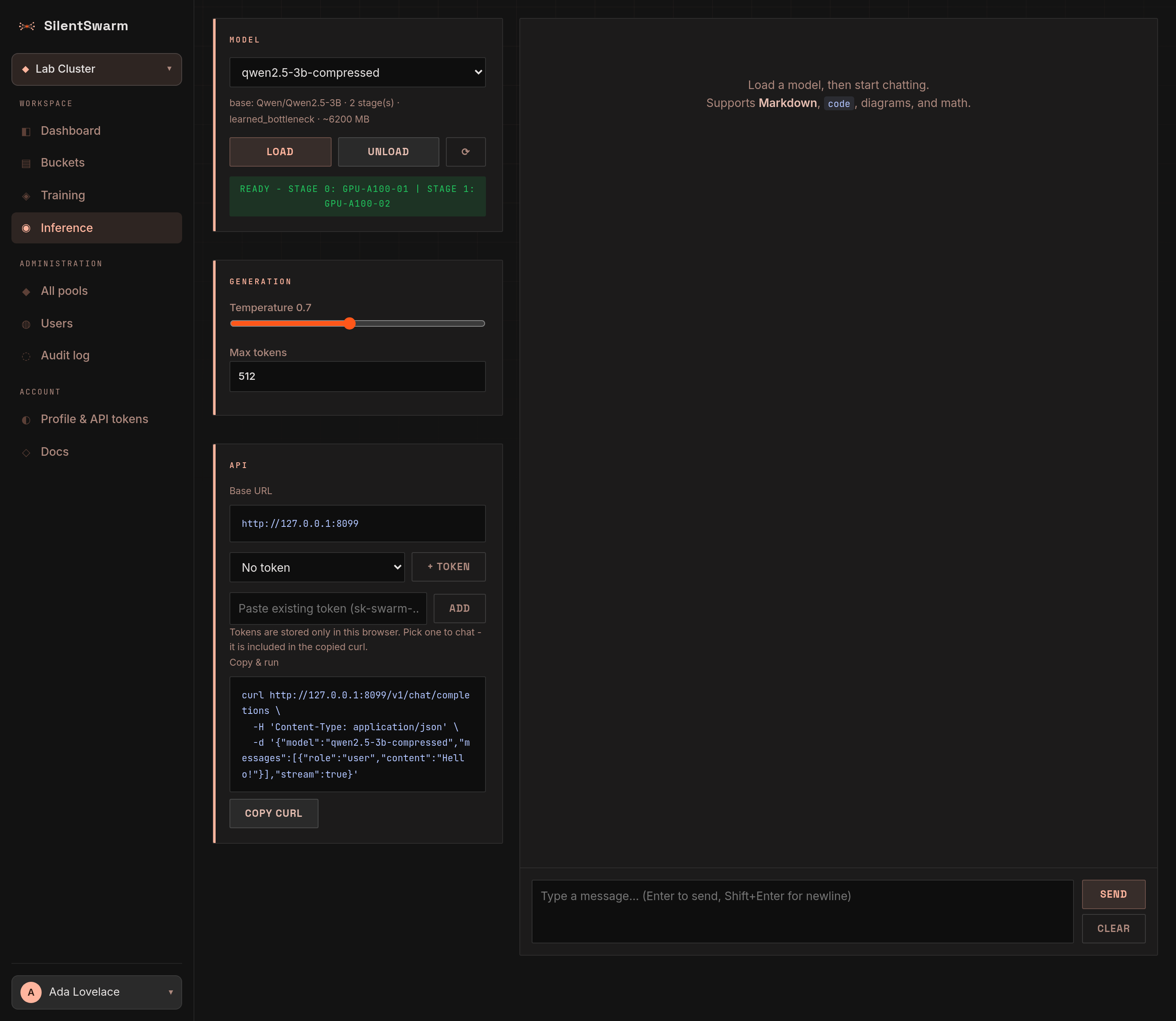
The page is built around the conversation: the chat fills the centre, a one‑row header above it holds the model controls, and a column on the right shows your saved chats, the model's performance or the settings. You can hide it.
Header
- Context — next to the title: the pool the model list comes from (or All your pools when no pool is selected) and a status pill for the selected model (Model ready, Model loading, Model recovering, Model not loaded, Model load failed). Screen readers announce the pill when it changes.
- Model picker — every model trained and exported in this pool. Incomplete models (missing a shard from one node) are listed but cannot be picked.
- Load / Unload — Load starts serving the selected model; while it loads the button shows a spinner, and once the model is ready it turns into Unload, which frees the VRAM again.
- Chats, Performance and Settings — pick what the right-hand column shows: your saved chats, how the model performs, or the settings. Pressing the one that is showing hides the column. The choice is remembered in this browser; the page opens on the chats. On screens narrower than 900 px the column moves below the chat, and opening it scrolls there; on a phone the buttons show only their icons.
A load can be refused before it starts, with a message like stage 0 on
gpu-1 needs 15.2 GB (9.0 GB weights + 4.8 GB KV cache at 8192 tokens), has 12.0
GB free. That is the leader budgeting the KV cache the stage will allocate on
top of its weights - see Serving VRAM. Serving on a
node with more free VRAM, or lowering SWARM_SERVE_CONTEXT_TOKENS, makes it
fit. A model served over several stages keeps up to four requests per stage
in flight, sized for a typical chat of about 1,024 tokens
(SWARM_SERVE_TYPICAL_TOKENS); on smaller cards the leader lowers that to what
the KV caches fit instead of refusing the load, and further requests wait
their turn. A long conversation waits until it fits beside the others.
A chat can also be refused when it is longer than the whole pool can
hold: this conversation needs 4312 tokens (3800 in the prompt and up to 512
in the reply); the pool serving this model holds 4096. The API answers it
with a 413 (context_length_exceeded in a stream). Start a new conversation,
lower Max tokens, or serve on cards with more free VRAM - the pool always
holds at least one conversation of SWARM_SERVE_CONTEXT_TOKENS (4,096).
On one PC. A model trained over several fellows can also serve on one PC
whose cards hold it together - Qwen3-14B in 4 bits (8.3 GB) on two 6 GB cards,
say - with no network between its layers:
swarm model-load <model> --num-stages 1 [--fellow-id N], or num_stages: 1
on POST /api/v1/models/{id}/load and the models_load MCP tool. Its learned
bottleneck is applied inside the PC, so it answers as the trained model does.
It serves one request at a time, and needs the fellow on the current version
(swarm update).
Long prompts go through the stages in pieces of 256 tokens
(SWARM_SERVE_PREFILL_CHUNK on the fellow): a 1,500-token prompt that ran a
4 GB card out of memory in one piece now serves. The reply is the same; its
prefill time in the performance column covers every piece.
A single-node model needs its weights plus 1 GB free on one fellow. When no
fellow has that, the message names each one's free VRAM or state, e.g. The
model needs 4.0 GB free on one fellow: fxserver has 1.2 GB free; fxserver96 has
2.3 GB free. Right after a training run that is usually the run itself: the
job shows Completed as soon as the last step is done, but the fellows keep the
model in VRAM for a few more minutes while they export it and upload it to the
leader. Try again once that is through.
Fellows fetch a model they have not cached from the leader with their node
credential (/api/v1/models/{model_id}/archive/node). A fellow on a build from
before this route asked the operator route instead and failed with 401
Unauthorized ... /archive; swarm update fixes it. A stage of a
distributed model fetches only its own files
(/api/v1/models/{model_id}/shards/{stage}/weights, resumed where a broken
download stopped) and falls back to the whole archive on a leader from before.
When a stage's node goes away. A model served across several nodes no longer goes down when one of them does. Within a few seconds of the node falling silent the leader:
- tells the other stages to drop every request in flight and listen on a new set of relay channels - nothing the old ring left behind is read;
- loads the lost stage on another node of the pool - a standby first, else an active node serving nothing - with the stage's VRAM free;
- once it is ready, sends the requests that were cut off again, each as its prompt plus the words it had already streamed, with the tokens it had left.
A chat that was streaming shows a pause, then goes on where it stopped; new
chats wait meanwhile instead of being refused. The pill reads Model
recovering, the model stays listed, and nobody has to load it again. If no
node can take the stage within five minutes (SWARM_SERVE_FAILOVER_WAIT_S),
the model is unloaded as before and the waiting chats get the error. This
needs every stage's node on a version that can be rewired (swarm update); a
node that comes back while its stage has been replaced is told to unload it.
With a hot cover of the stage on a standby (see
Pools) the replacement is already loaded, and the
pause is seconds.
Chat
Type a prompt and Send (Enter to send, Shift+Enter for a new line); the model streams its reply, and Stop ends it early. Sending while the model is not loaded loads it first. Replies render Markdown, code (with a copy button per block), tables, mermaid diagrams, math, and collapsible Reasoning blocks from reasoning models. New chat starts a fresh conversation; the one you leave stays in your saved chats. Switching to another model keeps the conversation - each reply notes the model that wrote it.
- Suggested prompts — an empty conversation offers a few example prompts. Picking one puts it in the message box, so you can adjust it before sending. They are switched off, with a note, until the model is loaded.
- Idle unload — a fellow frees a model nobody has used for 15 minutes
(
SWARM_MODEL_IDLE_UNLOAD_Son the fellow,0keeps it loaded). The page then shows Model not loaded; Load brings it back, and so does simply sending a message. If a fellow drops the model without saying so (a fellow from before this was reported, or a model server that died), the first message gets "model ... is not loaded" from it; the leader then marks the model unloaded on every fellow that held it, and the page loads it again and sends the message once more by itself - you see loading it again in place of the reply instead of an error. - Both stages stay loaded while in use — a model served across fellows has a second stage that never receives a chat itself (it only answers the first stage), so its fellow used to unload it as idle 15 minutes after the load, however busy the model was. Chats then came back empty while the page still said Model ready. The second stage now reports its activity to its fellow. Until your fellows run that version, the leader catches the symptom: a model with a stage missing shows Model load failed ("stage 1 is no longer loaded"), and an empty reply from a pipelined model counts as "not loaded" - the leader unloads what is left and the page loads the model again and resends your message.
- Warm-up — while a model loads, every stage runs one short dummy pass before it reports ready, so the GPU's one-time set-up (tens of seconds on older cards) is not paid by the first message after a load.
- End of a reply — a reply ends when the model writes its end-of-turn
token, or at Max tokens. The API's
finish_reasonsays which:stoporlength(andusagecounts the prompt and reply tokens). A model served across several fellows used to ignore the end-of-turn token: every reply ran to Max tokens, a reasoning model's Reasoning block never closed, and the model went on to write the user's next message itself. Fellows that predate the fix still do that untilswarm update. - Streaming — the serving fellow hands tokens to a sender that posts
whatever piled up during its previous request as one batch, so the round
trip to the leader (often 50-100 ms) no longer limits how fast a reply
streams; the leader still streams and counts them one by one. The last chunk
carries the exact
usage(prompt and reply tokens), also for a model on a single GPU, whose stream sends text pieces that are often whole words. - Speed — under each reply, how fast it was generated: tokens per second
after the first token (the steady rate), how many tokens the reply has, and
how long the first one took. When the fellows measure it, the line goes on
with where each token's time went:
stage 0 4 ms/token · link 152 ms ·
  stage 1 5 ms
(one fellow:compute 12 ms/token) - see Time per token. Measured in your browser from the stream, so it includes the network; if a proxy delivers the reply in one burst, the rate is taken over the whole request instead. - Message actions — under each reply: the model that answered, Copy (the reply as Markdown) and, on the latest reply, Regenerate, which sends your last message again in place of the reply. A failed reply offers Retry instead. Under your own messages: Copy and Edit. Edit puts the message back in the message box; sending replaces it and everything after it, and Cancel (or Escape) leaves the conversation as it was. With a mouse the actions appear on hover or focus; the latest reply always shows them.
When a reply finishes, screen readers hear its opening lines; the transcript itself is a scrollable region you can reach with the keyboard.
Performance
Performance in the header shows how the selected model performs across the cluster. It refreshes every two seconds while it is open, and not at all while it is closed.
Time range — the switch beside Speed: 15m (live, from the leader's
memory) or 1h, 6h, 24h, 7d, rolled up from the leader's serving
history. Every finished request is kept there with its tokens, timings and
time split, for SWARM_SERVING_HISTORY_DAYS days (default 7) - so the longer
ranges survive a leader restart. The chart's steps grow with the range (30
seconds up to three hours); the choice is remembered in this browser.
- Speed — tokens per second of the reply streaming right now (or, between replies, the median per reply over the last 15 minutes), the median time to the first token, and the tokens generated in 15 minutes. Below them, a chart of tokens per second over the last 15 minutes in 30-second steps; its label tells screen readers the peak and the latest value.
- Pipeline — one card per stage: the fellow and which layers it holds, then every GPU of that node - the one the stage runs on first (runs this stage, with the memory the model itself takes), the node's others dimmed (idle for this model) - each with load and memory bars, power and temperature. A served stage runs on one GPU, so a node with two cards shows one busy and one idle; that is expected, not a fault. Between two stages, the link: the bytes each token sends forward (the hidden state) and back (the token), how much crosses per second, and the round trip of each hop through the leader. A model served across fellows talks through the leader's relay, so every token goes fellow → leader → fellow and back.
- Time per token — a bar splitting each token's time into stage 0's compute, the link, and stage 1's compute, with milliseconds and shares, the time the prompt took, and the bytes sent per token, averaged over the replies of the last 15 minutes. That split is measured by the fellows. Until they report it (fellows from before the update), the bar shows what the leader's relay times by itself: stage 0's side and stage 1's side - each that stage's compute plus its trip to and from the leader - over the last 500 tokens. With only wire 1 between the stages, stage 1 cannot report its compute, so the fellows' bar shows Link and stage 1 together.
- The bottleneck in one sentence — under the bar: whether the link or compute takes most of each token, or which stage's side is slower, and whether the GPUs are mostly idle (then the network, not the cards, sets the speed).
- Last 15 minutes — replies (and how many failed), tokens generated, tokens per second per reply and time to first token at the median and 95th percentile, queue wait, and the mean time between tokens.
Direct link. A model split over two fellows used to send every token
through the leader: fellow → leader → fellow and back. Fellows on the current
version also open a direct link - stage 1 listens on its serving port
(SWARM_SERVE_PORT, default 5559), stage 0 connects to it - and use the
leader's relay only when the direct link cannot be reached or fails (a reply
that fails before its first token is asked again over the relay, unnoticed).
The Pipeline card then shows Direct link between the stages with the bytes
and milliseconds per token the fellows measured. Two fellows on one LAN need
port 5559 open between them - or nothing at all once Direct links are on
(Admin > Direct links): then the stages talk through an encrypted tunnel that
needs no open ports. SWARM_PIPELINE_TRANSPORT=tunnel on the leader keeps
serving on the relay.
Quantized models. A model fine-tuned with model.quantization (a
QLoRA run on a 4-bit base, say) serves the same way. Each fellow loads only
its share of the model, at 4 bits, with the trained adapters on top. A 70B
model then needs about 40 GB in all, not 140 GB. To serve such a model in full
precision, or a full-precision model at 4 or 8 bits, load it with
quantization (models_load on MCP: nf4, int8 or none). Only fellows on
the current version take a quantized load; with too few of them, the model
loads in full precision. int4-fast serves the 4 bits with torchao's faster
decode kernels on fellows that have it installed (pip install torchao in the
fellow's environment), and as plain nf4 elsewhere.
More than two fellows. A model trained over three or more fellows serves
over as many: the hidden state passes from fellow to fellow and the next token
goes from the last one straight back to the first. The Pipeline card shows one
link per hop, and the last one also carries the token back to stage 0. With
direct links, every fellow listens on its serving port and connects to the
next one, so each pair of neighbours (and the last and the first) needs
SWARM_SERVE_PORT open between them, or Direct links on. Every fellow in the
ring needs the current version; a load that includes an older one is refused
with its name.
Several chats at once. A model served over several fellows answers as many chats at once as it has stages: while the last fellow picks one chat's next word, the first already works on another's. Each reply comes as fast as before, and the model serves that many times more in all. Every fellow in the pipeline needs the current version; otherwise chats are answered one after another, as before.
Drafting ahead. A served model can guess
a few words ahead and check them all in one pass: it looks for the last words
it wrote earlier in the conversation and proposes what followed them there.
Where a reply repeats what it was given - a code edit, a summary that quotes
its source - one pass then yields two or three words instead of one; in an
ordinary chat it rarely finds anything to propose and changes nothing. The
reply is the same either way: a wrong guess is thrown away and costs only a
little extra work in that pass. It is off by default; SWARM_SERVE_SPECULATIVE=2
on the leader turns it on for the next load (2 words ahead), and the reply's
swarm.timing then counts the passes (spec_passes), the words they produced
(spec_tokens) and the guesses made and kept (spec_drafted,
spec_accepted). A model split over several fellows drafts only when every
one of them runs the current version, and only while it has no more chats than
fellows - when it is busier, every fellow has work already and guessing would
only slow the others down. With SWARM_SERVE_DRAFT_MODEL=auto as well, a
model split over several fellows also guesses with a small model of its family
(for Qwen3 models, Qwen3-0.6B), which guesses ordinary conversation too - not
only what repeats. The last fellow needs about 1.5 GB more for it, and its
token budget gets smaller.
When the link takes most of each token's time, the fellows are waiting on the
network, not on their GPUs: a faster connection to the leader (or fellows that
can reach each other directly) speeds the model up, and a bigger GPU does
not. The same numbers are at GET /api/v1/models/{model_id}/performance and
in the MCP tool models_performance.
Saved chats
Every conversation is saved on the leader after each reply, under your
account: it survives a reload, and you find it again in another browser or on
another device. The address names the open chat (/pools/{owner}/{pool}/inference#chat=...),
so Back, a bookmark or a reload return to it.
- The list — the right-hand column (Chats in the header) lists your chats, most recently used first, grouped by Today, Yesterday, Previous 7 days, Previous 30 days and then by month. Each shows its title, the model last used, how many messages it has and when it was last used. Search chats filters by title or model. Pick a chat to reopen it, with each reply's model and speed line as they were.
- Title — a chat is named after the start of its first message. The bar above the conversation shows the title and Saved once the latest reply is stored (or Not saved with the reason).
- Rename and delete — the pencil and bin icons in that bar act on the open chat; the ... button on a row in the list has Rename and Delete for any chat. Deleting asks first and cannot be undone.
- Private — chats belong to you alone: nobody else sees them, admins included. Deleting your account deletes them too. A user can keep up to 1000 chats of up to 2 MB each; past that, delete some or start a new one.
- From an agent — the MCP tools
chats_list,chats_get,chats_renameandchats_delete(toolsetserving) reach the same chats with your token; see MCP tools. Over the REST API they areGET/POST /api/v1/chatsandGET/PATCH/DELETE /api/v1/chats/{chat_id}.
A chat is saved with your session, never with the API token picked under Settings, API - that one is for the model API.
Settings panel
Open it with Settings in the header. The panel scrolls on its own, so every control stays reachable however short the window is.
Model
The selected model's base architecture, number of stages, compression and
approximate VRAM, plus a status line with one entry per pipeline stage
(Stage 0: gpu-a100-01 · L0-17 · 3100 MB), so you can see which machine holds
which layers. While a model loads, a progress bar tracks download → extract →
load into VRAM. Refresh list re-reads the model catalogue. With no trained
models yet, the panel and the empty chat both link to Training.
Generation
- Temperature — sampling randomness (0 = deterministic). The other sampling settings are the model's own defaults (see Sampling below). A model served across fellows samples on its last stage; that stage uses the sampling of the request. Fellows from before the update, or a pipeline on wire 1, keep sampling at 0.7.
- Reasoning — on by default. Off asks a reasoning model (Qwen3) to answer
without thinking first, which is much faster; models without a thinking
mode ignore it. Remembered in this browser. It reaches the model two ways:
as the chat template's
enable_thinkingswitch (fellows on the current version), and for a Qwen3 model also as Qwen's/no_thinksoft switch at the end of your last message, which older fellows pass on unchanged. The empty Reasoning block a model writes when it skips thinking is hidden. A small or fine-tuned model may still reason now and then - the switch asks, it cannot force. Over the API this is"chat_template_kwargs": {"enable_thinking": false}in the request (the vLLM convention), andreasoning: falseon the MCPchattool. - Max tokens — response length cap (up to 4096).
Sampling
A chat request may set four sampling parameters. What it leaves unset, the leader fills in from the model before the request reaches a fellow:
| Parameter | Meaning | Qwen3, thinking | Qwen3 thinking off, Qwen2.5 | Other models |
|---|---|---|---|---|
temperature |
Randomness; 0 is greedy (always the most likely token) |
0.6 | 0.7 | 0.7 |
top_p |
Only the most likely tokens that together hold this much probability | 0.95 | 0.8 | 0.95 |
top_k |
Only the k most likely tokens; 0 is off |
20 | 20 | off ¹ |
min_p |
Only tokens at least this fraction as likely as the most likely one; 0 is off |
0 | 0 | 0 |
The Qwen values are the ones the Qwen model cards recommend (the
Instruct-2507 and Coder models get the thinking-off row). They matter: with no
top_k, the long tail of Qwen's vocabulary stays in play, and a reply that
samples one Chinese token tends to carry on in Chinese. A setting you send
always wins, so "top_k": 0 turns the filter off for a Qwen model too.
¹ A model served on one fellow, where the leader sends no top_k, keeps the
top_k of its own generation_config.json (transformers' default is 50).
The filters apply in the order transformers applies them: temperature, then
top_k, top_p, min_p. Over the API they are fields of the request body
("top_k": 20; top_k and min_p go in the openai package's extra_body);
on the CLI, swarm infer --temperature --top-p --top-k --min-p; on the MCP
chat tool, its temperature, top_p, top_k and min_p arguments. A
pipeline whose last stage runs on a fellow from before top_k/min_p
samples without those two.
API
Everything you need to call the model programmatically:
- Base URL — the OpenAI‑compatible endpoint, with a copy button.
- Token — pick a saved token, New token to create one (you name it in a dialog; the token is shown once, so copy it then), or paste an existing one and Add it. Tokens are stored only in this browser; the selected one is used for the chat and filled into the examples. With No token the page chats as you, signed in.
- Example request — tabs with a ready‑made request against
/v1/chat/completionsin curl, Python (theopenaipackage) and JavaScript (fetch), each with a copy button.